7 May 2026
Foundations of Agentic Software Delivery
How to set up agents, plans, permissions, and verification so AI coding agents can deliver software autonomously and safely.
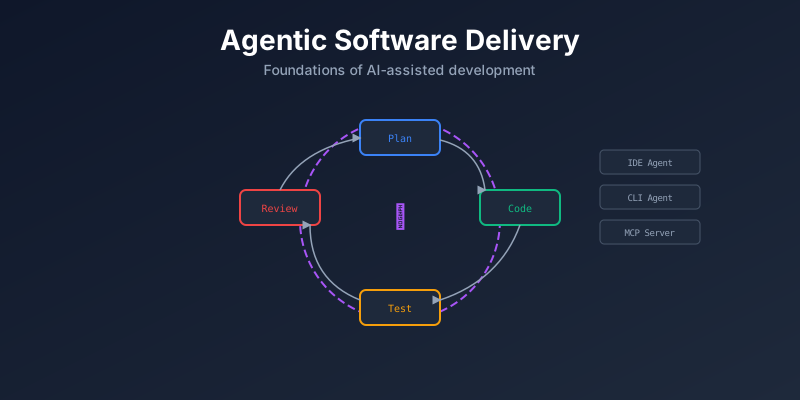
Agentic software delivery is about giving AI coding agents the direction, guardrails, and feedback loops they need to ship real work. Here’s how I think about the foundations — from IDEs and configuration to permissions, skills, and orchestration.
General improvements
- Use Enlighs, other languages might take more tockens.
- Start a new chat session as soon as possible to avoid to much context in the same session. The more context, the more cost.
- Caveman system-prompt.
- Running agents in a container with a sandbox in a cloud environment is long-term where we are going
IDEs
- VS Code
- Claude Code
- Google Antigravity
Claude Code
/initthen trim CLAUDE.md. Claude explore current project and writes tips for itself. Add it in Git Repo for others.- Settings hierarchy:
- Enterprise managed
- Use: ~/.claude/
- Project shared: .claude/
- Project local: .claude/
/permissionsbuild an allowlist. Automode good but sill can be bypassed, do not use it intially in new projects.- Plan before you let it code, huge impact in better outcome. Go to plan mode (Shift+Tab), edit the plan, and implement (Ctrl+G). Ask what issues anticipates, what could go wrong and what is missing. Include Acceptance Criteria in the plan so you can measure so know when plan succeded.
/compact,/clear,/contextquality degrades smoothly as context fills.- Steer in real time. Don’t wait agent to finish wrong turn.
Escinterrupt,Esc+Escrewind last message andShift+bexecute in background. - Give it a way to check its own work. Anthropic calls this “the single most impactful practice”. Give specific tests and tools to run it.
MCP
Local MCPs for quick reviews.
- ~/AppData/Roaming/Code/User/mcp.json
- .vscode/mcp.json
Agent Foundations
- CLI, Desktop, VSCode extensions, etc
- Context window and token size
- Auto-mode
- Planning and real-time steering
- /init for Claude Code
Agent configuration
- Local agents at depth
- Plan-first for bigger tasks
- Verification + human-in-the-loop
- Permissions
- Skills
- Tools
Harness you give Cloud the ability to verify itself (tool requests, review and tests). So you give it a plan that describes what you want and how does success look like. And then Cloud can
Ingredients for autonomy:
- Direction (Plans with Acceptance criteria): Sets the destination and foundation for self-verification.
- Containment (Permissions and Sandbox): Bounds the worksoace.
- Quality gates (Fast feedback): Signal during work.
- Verification (Automated tests): Proof at the end.
- Continuity (Persistent memory): Context across runs.
- Reach (MCP & Tools): What the agent touches beyond local files.
Permissions
Permissions in .claude/settings.json this has a permission object that can allow, deny or ask for specific commands, like deny to read .env or delete stuff, allow to use some git commands and ask before commiting. Enable sandbox, this blocks if tries to read anything outside the workspace.
By default depends on the mode. Default will ask you. Alow all not recommended. Always deny if not allowed this more for CI.
Misc
- In
CLAUDE.mdfile specify@AGENTS.mdto be more agnostic for future agents and the agents file is more standarize indeustry wise. Project-wide rules and can have things like software principles, project, priorities, etc. .claude/rulesdirectory specific for path based rules, like ifmarketing/then specify the content format or any type of context or instructions for that path. Same as Cursor rules.- User
Users/<username>/.claude/project/<project_name>/memory/MEMORY.mdfor long-term memory, this is not shared with other users and not commited to the repo. Use it for things like “I prefer concise commit messages” or “We use tabs instead of spaces”. This is different from theCLAUDE.mdfile that is shared with everyone and commited to the repo. To not enforce the same rules for everyone in the project. - skills.sh public repository of agent skills that works across a wide range of agents.
- In
.agents/skills/host skills directories with specific skills installed on the project context. It creates askills-lock.jsonfile to track the installed skills and their versions. This is useful for reproducibility and sharing skills across projects. Usually this are in user level in the computer not shared across project. - skills.sh/grill-me relentless interviewing skill that stress-tests plans and designs through systematic questioning. It has been proven to significantly enhance the robustness and reliability of agent-generated solutions, making it an essential tool for any project aiming for high-quality outcomes.
- Skills are commands to inject prompts, tools, or specific behaviors into the agent.
- Custom skills are shared in the repo but installed skills are ignored to commit.
/Users/<username>/.claude/Claude.mdis the user-level file for personal preferences and instructions, this will be injected in the context of all projects for that user.- caverman is a system prompt engineering framework that provides a structured approach to designing and implementing effective prompts for language models. It emphasizes simplicity, clarity, and directness in prompt construction, making it less expensive in terms of tokens and more efficient for guiding agent behavior.
- Context Engineering is the practice of designing the input context for LMs to optimize their performance and output quality. Selecting and organizing the information provided to the model, including instructions, examples, and relevant data, to guide its understanding and response generation effectively. This is a lot a bout that. With prompt engineering. It makes the difference in quality outcome and token consumption. Practice, learn from others and try different approaches.
- Opus arhictecture and plans. Sonnet daily driver. Haiku bulk work, and long loops. To point that each model has diffrent usage. You can use Opus for everything but it will cost a lot of tokens and is slower.
Agent orchestration
- Cloud agents, subagents
- Teams of agents
- Long-running, parallel work