31 May 2026
dbt: Data Build Tool
An overview of dbt — the tool that brings software engineering best practices to data transformations in your warehouse.
dbt (data build tool) transforms data inside your warehouse using SQL. It brings software engineering practices (version control, testing, documentation) to analytics.
What Is dbt?
dbt handles the T in ELT:
Extract → Load → Transform (dbt)
                      │
              SQL models in your warehouse
              (Snowflake, BigQuery, Redshift, Databricks)
Key idea: Write SELECT statements. dbt handles the rest (DDL, dependencies, testing).
How It Works
┌─────────────────────────────────────────┐
│  dbt Project (your repo)                │
│  ├── models/          (SQL files)       │
│  ├── tests/           (data tests)      │
│  ├── macros/          (reusable SQL)    │
│  ├── seeds/           (CSV files)       │
│  ├── snapshots/       (SCD Type 2)      │
│  └── dbt_project.yml  (config)          │
├─────────────────────────────────────────┤
│  dbt CLI / dbt Cloud                    │
│  dbt run → compiles SQL → executes      │
├─────────────────────────────────────────┤
│  Data Warehouse                         │
│  (creates tables/views from your SQL)   │
└─────────────────────────────────────────┘
Models
A model is a SQL SELECT statement saved as a .sql file. dbt turns it into a table or view in your warehouse.
-- models/staging/stg_orders.sql
SELECT
    id AS order_id,
    user_id AS customer_id,
    order_date,
    status,
    amount
FROM {{ source('raw', 'orders') }}
WHERE status != 'deleted'
Materialization Types
| Type | What It Creates | When to Use |
|---|---|---|
| view | SQL view | Light transformations, small data |
| table | Physical table | Heavy queries, large data |
| incremental | Append/merge new rows | Large tables, daily loads |
| ephemeral | CTE (no object created) | Intermediate logic |
-- models/marts/fct_orders.sql
{{ config(materialized='incremental') }}

SELECT
    order_id,
    customer_id,
    order_date,
    amount
FROM {{ ref('stg_orders') }}

{% if is_incremental() %}
WHERE order_date > (SELECT MAX(order_date) FROM {{ this }})
{% endif %}
Project Structure
dbt_project/
├── models/
│   ├── staging/          ← clean raw data (1:1 with sources)
│   │   ├── stg_orders.sql
│   │   └── stg_customers.sql
│   ├── intermediate/     ← business logic
│   │   └── int_order_items.sql
│   └── marts/            ← final tables for BI
│       ├── fct_orders.sql
│       └── dim_customers.sql
├── tests/
├── macros/
├── seeds/
└── dbt_project.yml
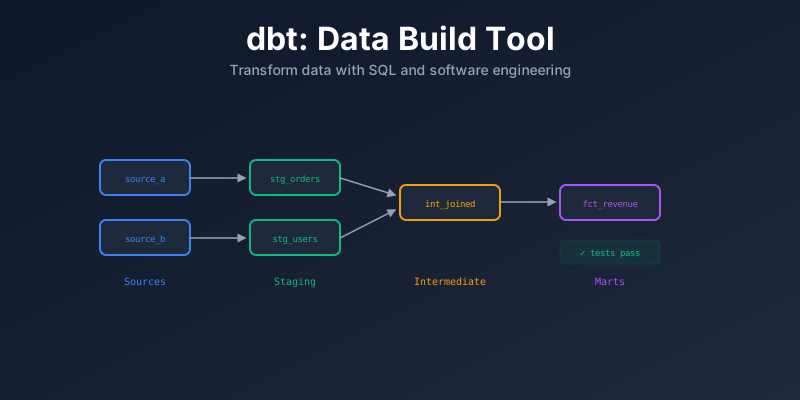
DAG (Dependency Graph)
dbt builds a DAG from {{ ref() }} calls:
source('raw', 'orders')
        │
  stg_orders ──→ int_order_items ──→ fct_orders
                                          │
  stg_customers ──→ dim_customers ────────┘
dbt run executes models in the correct order.
Key Features
Sources
Define where raw data comes from:
# models/staging/sources.yml
sources:
  - name: raw
    tables:
      - name: orders
        loaded_at_field: _loaded_at
        freshness:
          warn_after: {count: 12, period: hour}
          error_after: {count: 24, period: hour}
Tests
Built-in and custom data quality tests:
# models/staging/schema.yml
models:
  - name: stg_orders
    columns:
      - name: order_id
        tests:
          - unique
          - not_null
      - name: status
        tests:
          - accepted_values:
              values: ['placed', 'shipped', 'completed', 'returned']
      - name: customer_id
        tests:
          - relationships:
              to: ref('stg_customers')
              field: customer_id
Macros
Reusable SQL snippets (Jinja):
-- macros/cents_to_dollars.sql
{% macro cents_to_dollars(column_name) %}
    ({{ column_name }} / 100)::decimal(10,2)
{% endmacro %}

-- Usage in a model:
SELECT
    order_id,
    {{ cents_to_dollars('amount_cents') }} AS amount_dollars
FROM {{ ref('stg_orders') }}
Seeds
Load small CSV files into your warehouse:
seeds/country_codes.csv → dbt seed → country_codes tableSnapshots
Track changes over time (SCD Type 2):
-- snapshots/snap_customers.sql
{% snapshot snap_customers %}
{{ config(
    target_schema='snapshots',
    strategy='timestamp',
    unique_key='customer_id',
    updated_at='updated_at'
) }}
SELECT * FROM {{ source('raw', 'customers') }}
{% endsnapshot %}
dbt Commands
| Command | What It Does |
|---|---|
dbt run | Build all models |
dbt test | Run all tests |
dbt build | Run + test (in order) |
dbt run --select model_name | Build one model |
dbt run --select model_name+ | Build model + downstream |
dbt docs generate | Generate documentation |
dbt source freshness | Check source freshness |
dbt seed | Load CSV seed files |
dbt snapshot | Run snapshots |
dbt Core vs dbt Cloud
| Feature | dbt Core (Free) | dbt Cloud (Paid) |
|---|---|---|
| CLI | Yes | Yes |
| Web IDE | No | Yes |
| Scheduling | External (Airflow, cron) | Built-in |
| CI/CD | Set up yourself | Built-in |
| Documentation | Generate locally | Hosted |
| Logging | Local | Centralized |
Summary
| Concept | Key Idea |
|---|---|
| dbt | SQL-based transformations inside your warehouse |
| Model | A SELECT statement that becomes a table/view |
| ref() | Links models, builds dependency graph |
| Tests | Data quality checks (unique, not null, etc.) |
| Materializations | view, table, incremental, ephemeral |
| Macros | Reusable SQL with Jinja |
| Snapshots | SCD Type 2 tracking |
| Best practice | staging → intermediate → marts |