18 April 2026
Git Flows: Choosing the Right Branching Strategy
A practical comparison of Git Flow, GitHub Flow, GitLab Flow, and Trunk-Based Development to help you pick the right branching strategy for your team.
Choosing the right Git branching strategy can make or break your team’s delivery speed. Here’s a quick breakdown of the most common approaches and when to use each one.
Git Flow
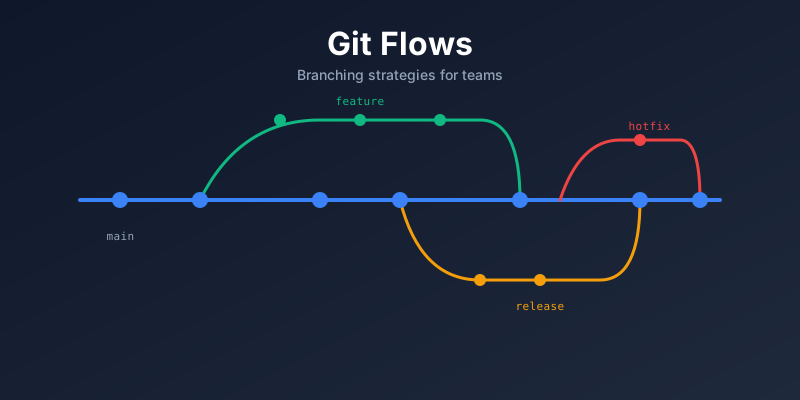
Created by Vincent Driessen in 2010, Git Flow is the most structured model. It uses long-lived branches with specific roles:
- main — production-ready code
- develop — integration branch for features
- feature/* — one per feature, branched from
develop - release/* — preparation for a release, branched from
develop - hotfix/* — urgent fixes, branched from
main
When to use it: Projects with scheduled releases, multiple versions in production, or teams that need formal release gating (e.g., enterprise software, mobile apps).
Downsides: Overhead of managing multiple long-lived branches. Merges can become complex.
GitHub Flow
A simplified model with just one rule: anything in main is deployable.
- Create a branch from
main - Make commits
- Open a Pull Request
- Review and discuss
- Merge to
mainand deploy
When to use it: Web applications with continuous deployment, small teams, or projects where every merge goes straight to production.
Downsides: No built-in concept of releases or environments. You need solid CI/CD and automated testing.
GitLab Flow
A middle ground between Git Flow and GitHub Flow. It adds environment branches to GitHub Flow:
main→staging→production
Or release branches for versioned software:
main→release/1.0→release/2.0
When to use it: Teams that need environment promotion (dev → staging → prod) or versioned releases but want less ceremony than Git Flow.
Trunk-Based Development
The most minimal approach. Everyone commits to a single branch (main / trunk), usually multiple times a day.
- Short-lived feature branches (< 1 day) are optional
- Feature flags control incomplete work in production
- Requires strong CI/CD, automated testing, and code review
When to use it: High-performing teams practicing continuous delivery. Google, Meta, and Microsoft use this at scale.
Downsides: Requires discipline and tooling. Not ideal if your CI/CD pipeline is slow or unreliable.
Quick Comparison
| Strategy | Complexity | Best For | Release Model |
|---|---|---|---|
| Git Flow | High | Scheduled releases, multiple versions | Formal releases |
| GitHub Flow | Low | Web apps, continuous deployment | Every merge |
| GitLab Flow | Medium | Environment promotion, versioned releases | Environment-based |
| Trunk-Based | Low | High-performing teams, continuous delivery | Feature flags |
My Take
For most teams I’ve worked with in pharma and enterprise environments, GitHub Flow or GitLab Flow hits the sweet spot — simple enough to keep velocity high, structured enough for compliance and auditability. If you’re just getting started, begin with GitHub Flow and add complexity only when you need it.
The key takeaway: pick the simplest strategy that meets your team’s needs, and invest in CI/CD automation rather than branching complexity.