31 May 2026
Hooks: Webhooks, Git Hooks, and Data Pipeline Hooks
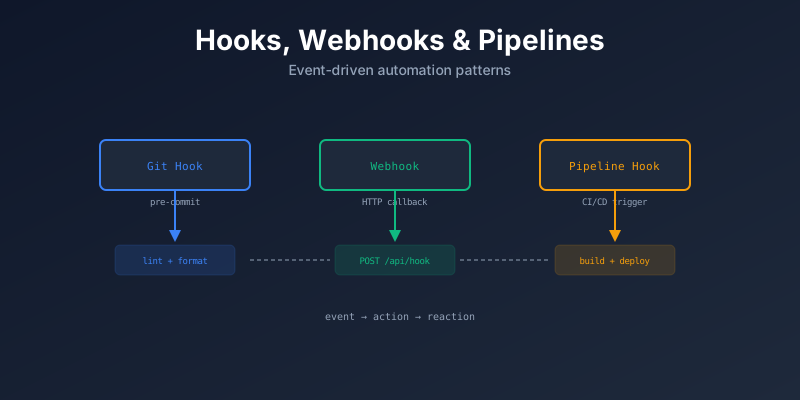
Understanding hooks in different contexts — webhooks for APIs, Git hooks for version control, and hooks inside data pipelines.
Hooks are a pattern for executing custom code at specific points in a process. They appear everywhere in software.
What Is a Hook?
A hook is a point in a system where you can plug in your own code to run automatically when something happens.
Event happens → Hook triggers → Your code runsWebhooks
Webhooks are HTTP callbacks. When an event happens in a service, it sends an HTTP POST to your URL.
GitHub (push event) ──HTTP POST──→ Your Server (/webhook)
                                        │
                                   Process event
                                   (deploy, notify, etc.)
How They Work
- You register a URL with the service
- An event happens (push, payment, message)
- The service sends a POST request with event data
- Your server processes the data
Example: GitHub Webhook
from fastapi import FastAPI, Request
import hmac
import hashlib

app = FastAPI()

@app.post("/webhook")
async def github_webhook(request: Request):
    payload = await request.json()
    event = request.headers.get("X-GitHub-Event")

    if event == "push":
        branch = payload["ref"]
        if branch == "refs/heads/main":
            trigger_deployment()

    return {"status": "ok"}
Common Webhook Use Cases
| Service | Event | Action |
|---|---|---|
| GitHub | Push, PR opened | Deploy, run CI |
| Stripe | Payment received | Fulfill order |
| Slack | Message posted | Bot response |
| Twilio | SMS received | Auto-reply |
Security
Always verify webhook signatures:
def verify_signature(payload, signature, secret):
    expected = hmac.new(secret.encode(), payload, hashlib.sha256).hexdigest()
    return hmac.compare_digest(f"sha256={expected}", signature)
Git Hooks
Scripts that run at specific points in the Git workflow. Located in .git/hooks/.
Types
| Hook | When It Runs | Common Use |
|---|---|---|
pre-commit | Before commit | Lint, format, run tests |
commit-msg | After writing commit message | Validate message format |
pre-push | Before push | Run tests, check coverage |
post-merge | After merge | Install dependencies |
pre-rebase | Before rebase | Prevent on protected branches |
Example: pre-commit
#!/bin/sh
# .git/hooks/pre-commit

# Run linting
python -m flake8 src/
if [ $? -ne 0 ]; then
    echo "Linting failed. Fix errors before committing."
    exit 1
fi

# Run tests
python -m pytest tests/ --quiet
if [ $? -ne 0 ]; then
    echo "Tests failed. Fix before committing."
    exit 1
fi
Pre-commit Framework
Use the pre-commit tool to manage hooks easily:
# .pre-commit-config.yaml
repos:
  - repo: https://github.com/pre-commit/pre-commit-hooks
    rev: v4.5.0
    hooks:
      - id: trailing-whitespace
      - id: end-of-file-fixer
  - repo: https://github.com/psf/black
    rev: 24.3.0
    hooks:
      - id: black
  - repo: https://github.com/charliermarsh/ruff-pre-commit
    rev: v0.3.0
    hooks:
      - id: ruff
pip install pre-commit
pre-commit installData Pipeline Hooks
Hooks in data pipelines let you run custom code at specific stages of the pipeline.
Airflow Hooks
In Apache Airflow, hooks connect to external systems:
from airflow.hooks.postgres_hook import PostgresHook
from airflow.hooks.S3_hook import S3Hook

# Connect to database
pg_hook = PostgresHook(postgres_conn_id="my_database")
records = pg_hook.get_records("SELECT * FROM orders")

# Connect to S3
s3_hook = S3Hook(aws_conn_id="my_aws")
s3_hook.load_file("data.csv", key="exports/data.csv", bucket_name="my-bucket")
dbt Hooks
dbt uses pre-hook and post-hook to run SQL before/after a model:
-- In dbt model
{{ config(
    pre_hook="INSERT INTO audit_log VALUES (current_timestamp, 'start')",
    post_hook="INSERT INTO audit_log VALUES (current_timestamp, 'end')"
) }}

SELECT * FROM {{ ref('raw_orders') }}
Pipeline Lifecycle Hooks
Extract ──→ [pre-transform hook] ──→ Transform ──→ [post-transform hook] ──→ Load
                    │                                        │
              Validate schema                          Log metrics
              Check data quality                       Send alert
Claude Code Hooks
In Claude Code, you can use hooks to customize the behavior of the agent:
/initto set up project-specific context and tips/permissionsto manage what the agent can access
Check post Foundations of Agentic Software Delivery for more details on how to use hooks in Claude Code.
Comparison
| Hook Type | Trigger | Transport | Direction |
|---|---|---|---|
| Webhook | External event | HTTP POST | Service → You |
| Git Hook | Git action | Local script | Local execution |
| Pipeline Hook | Pipeline stage | Function call | Within pipeline |
Summary
| Concept | Key Idea |
|---|---|
| Webhooks | HTTP callbacks for external events |
| Git Hooks | Automate quality checks on commits |
| Pipeline Hooks | Custom code at pipeline stages |
| Security | Always verify webhook signatures |
| pre-commit | Framework for managing Git hooks |