5 January 2026
Solar System in Three.js: Learning 3D Web Graphics
An interactive 3D solar system simulation built with Three.js and WebGL to explore planets, orbits, and real-time rendering in the browser.
Projects Software
Three.js WebGL JavaScript
The Goal
I wanted to learn 3D web graphics — not through tutorials, but by building something visual and interactive. A solar system felt like the perfect project: it has orbits (math), textures (assets), lighting (rendering), and interactivity (camera controls).
What It Does
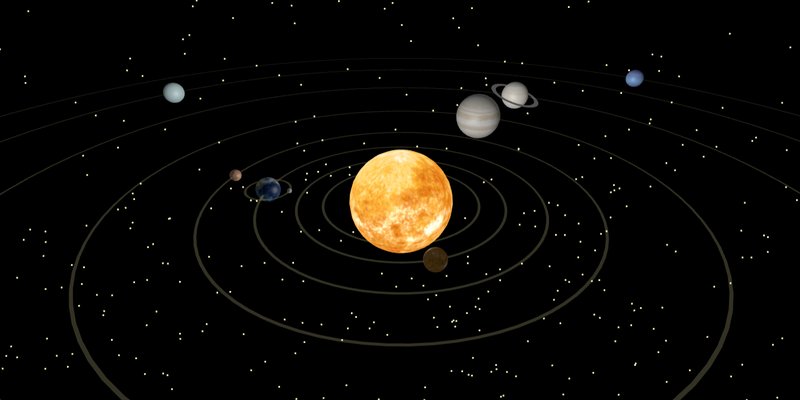
An interactive simulation of the solar system running entirely in the browser:
- All 8 planets orbiting the Sun with proportional distances and speeds
- Realistic textures — NASA texture maps applied to each planet
- Dynamic lighting — The Sun emits light, planets cast shadows
- Camera controls — Zoom, pan, and rotate to explore from any angle
- Orbit paths — Visible elliptical orbits for each planet
- Info panels — Click a planet to see facts and data
Technical Highlights
// Create a planet with texture and orbit
function createPlanet(radius, texturePath, orbitRadius, orbitSpeed) {
  const geometry = new THREE.SphereGeometry(radius, 32, 32);
  const texture = new THREE.TextureLoader().load(texturePath);
  const material = new THREE.MeshPhongMaterial({ map: texture });
  const mesh = new THREE.Mesh(geometry, material);

  // Orbit animation
  mesh.userData = { orbitRadius, orbitSpeed, angle: Math.random() * Math.PI * 2 };
  return mesh;
}

// Animation loop
function animate() {
  requestAnimationFrame(animate);
  planets.forEach(planet => {
    planet.userData.angle += planet.userData.orbitSpeed;
    planet.position.x = Math.cos(planet.userData.angle) * planet.userData.orbitRadius;
    planet.position.z = Math.sin(planet.userData.angle) * planet.userData.orbitRadius;
  });
  renderer.render(scene, camera);
}
Challenges
- Scale — The real solar system is impossibly large. I used logarithmic scaling for distances and exaggerated planet sizes to keep everything visible.
- Performance — High-resolution textures and multiple light sources can tank frame rates. Texture compression and LOD (level of detail) helped.
- Smooth orbits — Getting Keplerian elliptical orbits right (not just circles) required brushing up on orbital mechanics.
What I Learned
- Three.js abstracts WebGL beautifully, but understanding the underlying concepts (shaders, buffers, render pipelines) is still essential for debugging.
- The animation loop pattern (requestAnimationFrame) is the backbone of any real-time web application.
- Math is everywhere in 3D graphics — trigonometry for orbits, linear algebra for camera transforms, physics for realistic motion.
- Building visual projects is incredibly motivating — every small change produces immediate, satisfying feedback.
Try It
The project is open source: solar-system-threejs on GitHub