5 April 2026
Stop Running Code on Your Local Machine
Why you should never run frontend, backend, AI, scripts, or any code directly on your local machine — and the sandboxed alternatives that keep you safe and productive.
Your local machine is your most valuable tool. It has your credentials, SSH keys, browser sessions, personal files, and access to company resources. So why do we casually run untrusted code on it every day?
The Problem
Every time you run code locally, you’re giving it access to:
- Your file system — it can read, write, or delete anything your user can
- Your network — it can make requests to internal services, cloud APIs, or exfiltrate data
- Your credentials — environment variables,
.envfiles, cloud CLI sessions, SSH keys, browser cookies - Your hardware — CPU, GPU, memory (crypto miners love this)
This applies to all code:
npm installruns arbitrary scripts from thousands of packagespip installcan executesetup.pywith full system access- That “quick script” from Stack Overflow or an AI assistant
- Frontend dev servers, backend APIs, database engines
- AI/ML training scripts that download models from the internet
Real-World Risks
- Supply chain attacks: Malicious packages in npm, PyPI, and other registries are discovered regularly. A single compromised dependency in your
node_modulescan steal your AWS keys. - Typosquatting: Install
colorsssinstead ofcolorsand you’ve got malware. - Post-install scripts:
npm installruns lifecycle scripts that can do anything — download binaries, modify files, open network connections. - AI-generated code: LLMs can hallucinate packages that don’t exist. Attackers register those names with malicious code.
The Solution: Sandboxed Environments
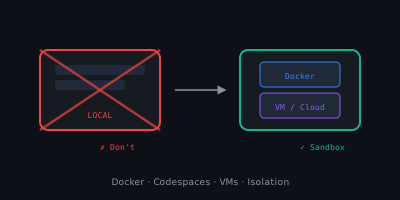
Run your code in an isolated environment where a worst-case scenario means you delete the sandbox, not reformat your laptop.
Docker Containers
The most accessible option. Run any project inside a container:
# Run a Node.js project
docker run -it --rm -v $(pwd):/app -w /app -p 3000:3000 node:20 npm run dev

# Run a Python project
docker run -it --rm -v $(pwd):/app -w /app python:3.12 python main.py
The container is isolated from your host. It can’t access your SSH keys, cloud credentials, or other files unless you explicitly mount them.
GitHub Codespaces
A full cloud-hosted dev environment. Your code runs on a remote VM, not your machine. Benefits:
- Zero exposure to your local file system
- Pre-configured with
devcontainer.json - Accessible from any device
- Organization policies can enforce security controls
Dev Containers (Local)
VS Code’s Dev Containers extension lets you develop inside Docker locally. You get the isolation of containers with the feel of local development:
{
  "name": "Safe Dev",
  "image": "mcr.microsoft.com/devcontainers/base:ubuntu",
  "features": {
    "ghcr.io/devcontainers/features/node:1": {}
  }
}
Virtual Machines
For heavier isolation, run a VM:
- Local: VirtualBox, Hyper-V, UTM (macOS), WSL2
- Cloud: Azure VMs, AWS EC2, GCP Compute Engine
VMs provide full OS-level isolation. Even if malware gets root inside the VM, your host is safe.
What About Performance?
The “but it’s slower” argument doesn’t hold anymore:
| Environment | Overhead | Good Enough For |
|---|---|---|
| Docker | ~5% CPU, minimal RAM | Almost everything |
| Codespaces | Network latency only | Web dev, scripts, APIs |
| Dev Containers | Same as Docker | Full-stack development |
| Local VM | ~10-15% | When you need full OS isolation |
Modern hardware handles containers without noticeable impact. Codespaces on a fast connection feel like local development.
A Practical Setup
Here’s what I recommend for most developers:
- Daily development: Dev Containers or GitHub Codespaces
- Quick scripts: Docker one-liners (
docker run --rm ...) - Untrusted code: Disposable VM or Codespace
- AI experiments: Containers with GPU passthrough, or cloud VMs
Keep your local machine for:
- Your IDE / editor
- Git operations
- Browser
- Communication tools
Everything else runs in a sandbox.
My Take
We lock our phones, encrypt our drives, and use 2FA — but then run npm install on 1,500 packages directly on our workstation. The threat model doesn’t make sense.
Sandboxing your development environment is not paranoia — it’s basic hygiene. Docker is free, Codespaces has a generous free tier, and Dev Containers work with VS Code out of the box.
The safest code is the code that can’t touch your machine.