31 May 2026
Large Language Models: Transformers, RAG, and Fine-Tuning
How transformers work, practical patterns like RAG and fine-tuning, and how to use vector databases for LLM applications.
Large Language Models (LLMs) are the foundation of modern AI assistants. Understanding how they work and how to build with them is essential.
How Transformers Work
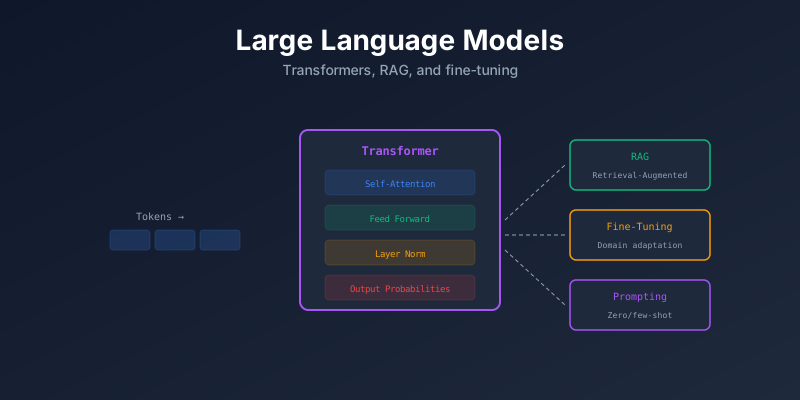
The Transformer architecture (2017, “Attention Is All You Need”) is the foundation of all modern LLMs.
Input Text → Tokenizer → Embeddings → Transformer Blocks → Output
                                            │
                                     Self-Attention
                                            +
                                     Feed-Forward
Key Concepts
| Concept | What It Does |
|---|---|
| Tokenizer | Splits text into tokens (words or subwords) |
| Embedding | Converts tokens into numerical vectors |
| Self-Attention | Each token “looks at” all other tokens to understand context |
| Positional Encoding | Adds position information (word order matters) |
| Feed-Forward | Processes each token independently after attention |
Self-Attention (Simplified)
For each word, the model asks: “How much should I pay attention to every other word?”
"The cat sat on the mat"

For "sat": attention weights might be:
  The=0.1  cat=0.5  sat=0.1  on=0.2  the=0.0  mat=0.1
Types of LLM Models
| Type | Training | Examples |
|---|---|---|
| Base model | Predict next token | GPT base, Llama base |
| Instruction-tuned | Follow instructions | ChatGPT, Claude, Llama-Chat |
| Fine-tuned | Specialized for a domain | Medical, legal, code models |
Retrieval-Augmented Generation (RAG)
RAG solves the problem of LLMs not knowing your private data. Instead of training the model, you give it relevant documents at query time.
User Query
    │
    ↓
┌─────────────┐     ┌──────────────┐
│ Embed Query │────→│ Vector DB     │
└─────────────┘     │ Search        │
                    └──────┬───────┘
                           │ Top-K documents
                           ↓
                    ┌──────────────┐
                    │ LLM Prompt:   │
                    │ Context + Query│
                    └──────┬───────┘
                           │
                           ↓
                       Answer
RAG Pipeline
# 1. Index documents
from langchain.text_splitter import RecursiveCharacterTextSplitter
from langchain.embeddings import OpenAIEmbeddings
from langchain.vectorstores import Chroma

# Split documents into chunks
splitter = RecursiveCharacterTextSplitter(chunk_size=500, chunk_overlap=50)
chunks = splitter.split_documents(documents)

# Store in vector database
embeddings = OpenAIEmbeddings()
vectorstore = Chroma.from_documents(chunks, embeddings)

# 2. Query
retriever = vectorstore.as_retriever(search_kwargs={"k": 5})
relevant_docs = retriever.get_relevant_documents("What is our return policy?")

# 3. Generate answer
prompt = f"Based on these documents: {relevant_docs}\n\nAnswer: {query}"
response = llm.invoke(prompt)
Fine-Tuning
Adapt a pre-trained model to your specific domain or task.
When to Fine-Tune vs RAG
| Approach | When to Use |
|---|---|
| Prompting | Simple tasks, no custom data |
| RAG | Need private/current data, factual answers |
| Fine-tuning | Need specific style, format, or domain behavior |
| Both (RAG + FT) | Maximum control and accuracy |
LoRA (Low-Rank Adaptation)
Fine-tune efficiently by training only small adapter layers:
from peft import LoraConfig, get_peft_model

config = LoraConfig(
    r=16,
    lora_alpha=32,
    target_modules=["q_proj", "v_proj"],
    lora_dropout=0.05,
)

model = get_peft_model(base_model, config)
# Train only ~1% of parameters
Vector Databases
Store and search text by meaning (semantic similarity), not keywords.
"How to deploy an app" → [0.2, 0.8, 0.1, ...] → Similar to:
  - "Application deployment guide" (0.92)
  - "Shipping containers to production" (0.85)
  - "Dog training tips" (0.12)
Popular Vector DBs
| Database | Type | Key Feature |
|---|---|---|
| Chroma | Embedded | Easy to start, Python native |
| Pinecone | Managed cloud | Scalable, serverless |
| Weaviate | Self-hosted/cloud | Hybrid search |
| Qdrant | Self-hosted/cloud | High performance |
| pgvector | PostgreSQL extension | Use existing Postgres |
LLM Engineering Patterns
Prompt Engineering
# System prompt sets behavior
messages = [
    {"role": "system", "content": "You are a helpful medical assistant. "
     "Only answer based on provided context. Say 'I don't know' if unsure."},
    {"role": "user", "content": "What are the symptoms of..."}
]
Guardrails
Validate LLM outputs:
- Check for harmful content
- Validate JSON structure
- Ensure answers stay on topic
- Prevent prompt injection
Evaluation
| Method | What It Measures |
|---|---|
| Human evaluation | Quality, helpfulness |
| LLM-as-judge | Automated quality scoring |
| BLEU/ROUGE | Text similarity to reference |
| Retrieval metrics | Precision/recall of retrieved docs |
Summary
| Concept | Key Idea |
|---|---|
| Transformers | Self-attention lets the model understand context |
| RAG | Give the LLM relevant documents at query time |
| Fine-tuning | Adapt model behavior for your domain |
| LoRA | Efficient fine-tuning (small % of parameters) |
| Vector DBs | Search by meaning, not keywords |
| Guardrails | Validate and control LLM outputs |